- Posts
- 246
- Location
- Osaka, Japan
- Joined
- 6 May 2005
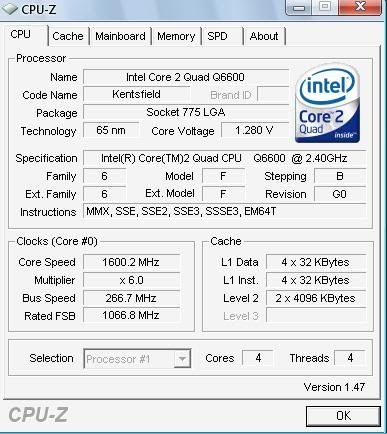
i dunno why but for some reason my windows xp detectes default cpu clock which is 2.4 instead 3.1(bios), do you guys have any ideas how to fix it? and does it actually effect anything?
some halp needed over here ; >
Rather, how did you oc it? Maybe you should read some ocguides. I assume you have intel and personally don't know so much about oc'ing them.
- Posts
- 246
- Location
- Osaka, Japan
- Joined
- 6 May 2005
'vartija'Rather, how did you oc it? Maybe you should read some ocguides. I assume you have intel and personally don't know so much about oc'ing them.
oced it in bios quite some time ago, everything used to be fine with windows detection till all of the sudden i've noticed some perfomarnce drop in ns which shouldnt be happening and then i've got this problem.
intel cpu + gigabyte mb
- Posts
- 499
- Location
- United Kingdom
- Joined
- 7 May 2005
Sounds like ur cpu down-clocked itself.
I'd try to overclock it again. See if the problem repeats itself.
-
- Donors
- Server Donator
- Posts
- 222
- Location
- Madrid, Kazakhstan
- Joined
- 9 May 2005
It's Intel energy saving. Look at the multiplier at x6.0. When you're doing "nothing" or idling, it lowers itself down.
Disable it and it should be 2.4Ghz all the time. I had problems with AMD power savings too. I couldn't unzip a .rar completely because it would cause some error in the middle, because everytime it went from .034 to 0.35 for example, it would crash.
- Posts
- 246
- Location
- Osaka, Japan
- Joined
- 6 May 2005
i know that dugi but that's not the problem, it should be 2.4 in idle state and 3.1 when needed higher performance, also it shows bus speed at 266 when it should 337.
didnt work lump ;x
Now that I think about it, my other computer had some quite similar problem. HTT default was 200 and I set it 250 at bios. Then in winxp it was 220. Clock ratio didn't change though. Wonder if that new xp update had something to do with it. I thought it was just nforce4 doing what it does best again.
I used software octool to rise HTT and memory frequency in windows, which worked.
- Posts
- 499
- Location
- United Kingdom
- Joined
- 7 May 2005
format, windows 7, overclock again.
old people
-
- Admins
- Provider & Webmaster
- Posts
- 490
- Location
- Finland
- Joined
- 1 May 2009
I got weird FPS spike issues in W7 too.
Blame danny.
- Posts
- 499
- Location
- United Kingdom
- Joined
- 7 May 2005
my w7 laptop is fine at about 100fps constant until someone else uses the internet in my house :F
Patphat
- Posts
- 130
- Location
- Stockholm, Sweden
- Joined
- 8 February 2007
Try disabling C1E support and/or intel speed step in BIOS.
Do you have the latest BIOS for your motherboard?
- Posts
- 499
- Location
- United Kingdom
- Joined
- 7 May 2005
because you download the frames? My connection drops and then it lags and fps drops to like 30 for a few seconds after the lag, usually.
-
- Donors
- Server Donator
- Posts
- 222
- Location
- Madrid, Kazakhstan
- Joined
- 9 May 2005
'tomato'because you download the frames? My connection drops and then it lags and fps drops to like 30 for a few seconds after the lag, usually.
I thought you were stupid but not that much, I swear to god.
'Danny'Try disabling C1E support and/or intel speed step in BIOS.
Do you have the latest BIOS for your motherboard?
WHAT DANNOOB SAID.
- Posts
- 499
- Location
- United Kingdom
- Joined
- 7 May 2005
well explain why my fps drops when someone else in the house uses the internet then you ever so clever trevor.
oh wait! you can't.. GOOD JOB
-
- Donors
- Server Donator
- Posts
- 222
- Location
- Madrid, Kazakhstan
- Joined
- 9 May 2005
You don't even know what's in front of your eyes, I won't explain shit to you because it's the same as talking to a wall.
Patphat
- Posts
- 130
- Location
- Stockholm, Sweden
- Joined
- 8 February 2007
Its a coincidence tom. Network lag per se will not affect your fps. You do not download the frames, they are calculated by the CPU and sent to your GPU, not going through the internet.
'Danny'Its a coincidence tom. Network lag per se will not affect your fps. You do not download the frames, they are calculated by the CPU and sent to your GPU, not going through the internet.
FPS drops actually effect your ping in netgraph.
i downloaded 2.000 more frames from the interwebs, now i have 2.200...
its like matrix
- Posts
- 499
- Location
- United Kingdom
- Joined
- 7 May 2005
'Danny'Its a coincidence tom. Network lag per se will not affect your fps. You do not download the frames, they are calculated by the CPU and sent to your GPU, not going through the internet.
Where do you think the calculations are from? It's from the packets you receive via internets. Like vartija said, my netgraph spikes when this happens, the two phenomena are related. If my client is getting delay and the round trip time suddenly doubles, it effects how things are rendered.
- lump, Computing with Networks BSc (Hons)
3D happy land
- Posts
- 240
- Location
- london, United Kingdom
- Joined
- 12 February 2010
That must have been the most amazingly boring degree.
"too much history can sometimes make you confuse" - aA, droppin' mad history on clowns since 2011.
Patphat
- Posts
- 130
- Location
- Stockholm, Sweden
- Joined
- 8 February 2007
Tom, i can download at max speeds on another PC, and have absolutly no fps drops on my PC. Why is this?
Some ethernet cards do take extra CPU power but in this day and age you really shouldn´t notice any big fps drops (perhaps i drop from ~500fps to ~490fps but i do not see this). There are "gamer" ethernet cards that are supposed to help against this though.
Vartija says that low fps can increase ping (ive seen this happen), you did not say this.
- Posts
- 499
- Location
- United Kingdom
- Joined
- 7 May 2005
me too, i've no idea.
You think connections between different protocols and applications are consistent with their problems? I don't.
If you're agreeing with vartija that there's a connection between fps and latency, how can you say that a high latency wouldn't cause fps drops?..
Also, this only happens when i play from my laptop using wireless internet at my families house. I have no control over this stuff and I'm moving to oz next week anyway so i don't really care? When I was downloading from my laptop and using my main PC for gaming at my last house on my own connection, i had absolutely no problems at all.
Anyway, we're derailing the thread, this is about windows xp cpu problems.
PS. wtf u on about george?
Battle of the nerds. Danny wins.
- Posts
- 499
- Location
- United Kingdom
- Joined
- 7 May 2005
'LITERALLY_GAY'That must have been the most amazingly boring degree.
AGREED
-
- Donors
- Major Server Funder
- Posts
- 614
- Location
- Wiener Neudorf, Austria
- Joined
- 16 April 2008
wow u are all really smart .. easy explanation .. someone else starts a download fucking crappy wireless shit internet is busy so his shitty crappy bullshit computer has to start searching for new network >> cpu is busy << FPS DROPS(did u not know NS is mostly going to ur cpu not ur GPU) ! .. MY GOODNESS !
and aA New Bios and check jumperconfig (changed motherboard?)
- Posts
- 499
- Location
- United Kingdom
- Joined
- 7 May 2005
Thanks Eistee, I was beginning to doubt my intelligence after dugi said such nasty words to me but now it's clear that we're all really smart